USA/Canada: +1 (888) 844-4213
  Rest World: +91-955-5514-144
  Whatsapp: +91-955-5514-144 | PARTNERS SERVICES CONTACT US ABOUT US
USA/Canada: +1 (888) 844-4213 Rest World: +91-955-5514-144 Whatsapp: +91-955-5514-144 | PARTNERS SERVICES CONTACT US ABOUT US
Whatsapp: +91-955-5514-144 | PARTNERS SERVICES CONTACT US ABOUT US
USA/Canada: +1 (888) 844-4213 Rest World: +91-955-5514-144 Whatsapp: +91-955-5514-144 | PARTNERS SERVICES CONTACT US ABOUT US
Consider the scenario of "Batch" converting User mailboxes from Zimbra OWA one by one enter the login details. Open KDETools Zimbra Cloud Migration Tool, then Select Source "Add login details" as Zimbra and Check 'Use Batch Mode' option
You can follow the two methods to Transfer unlimited number of Online Zimbra accounts to O365 / Exchange server/ Gmail/ Google workspace
Download and Install KDETools Online Batch Zimbra Cloud Converter - All in one
Steps-1: "Batch Zimbra Cloud Mailbox Migration in Single Time.

Steps:-2: "YES"Batch Zimbra Mailbox Migration in Single Time.

Answer:-3: Enter the Zimbra Hosting Server "IP Address" to Verify "Bulk Accounts" Configration.
**Server Address for *** ** * *

Steps:-4: Click on "Add login details" Option to Enter "Add One by One Bulk Accounts" at Once
Steps:-5: "Enter the Users Accounts Details to "ADD" Mutliple Mailbox in Bulk Mode.
**Users Email ID ** Password

Steps:-6: "Add Multiple Accounts successfully and Click on NEXT
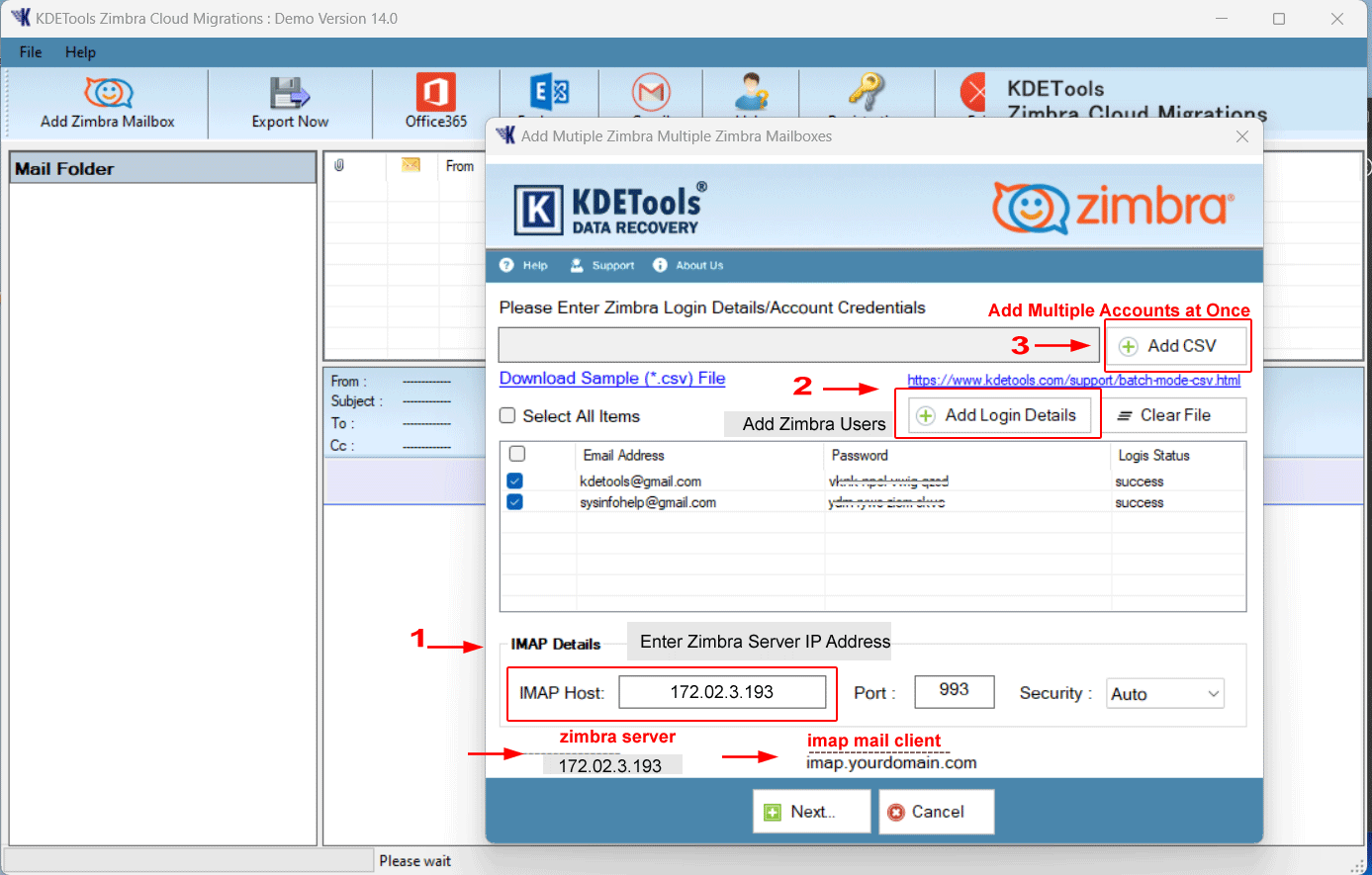
Steps:-7: Successfully Load and Display Preview of Bulk Accounts Mailbox Database folders Stractures and Click On O365.

Move Bulk Zimbra to Office 365 - Migrate Bulk Zimbra Users Profile to Microsoft Office 365:
Steps:-8: Click ON Menu Office 365 button to Enter the Microsoft Office 365 Login details.

Steps:-9: Transfering Process: - Click on "Convert" button to "Start Migration" to Migrate Bulk Online Zimbra Profile to Office 365 directly..

Move Bulk Zimbra to Exchange - Migrate Bulk Zimbra Users Profile to Exchange Server On-Premise:
Steps:-10: Click ON Menu "Exchange" button to Enter the Live Exchange Server "Onpremise" Login details.

Steps:-11: Transfering Process: - Click on "Convert" button to "Start Migration" to Migrate Bulk Online Zimbra Profile to Exchange On-Premise directly..

Ans: "YES", Simple & Easy Steps a CSV file Using Excel or Notepad".
"Steps 1:-Open Notepad on your system.
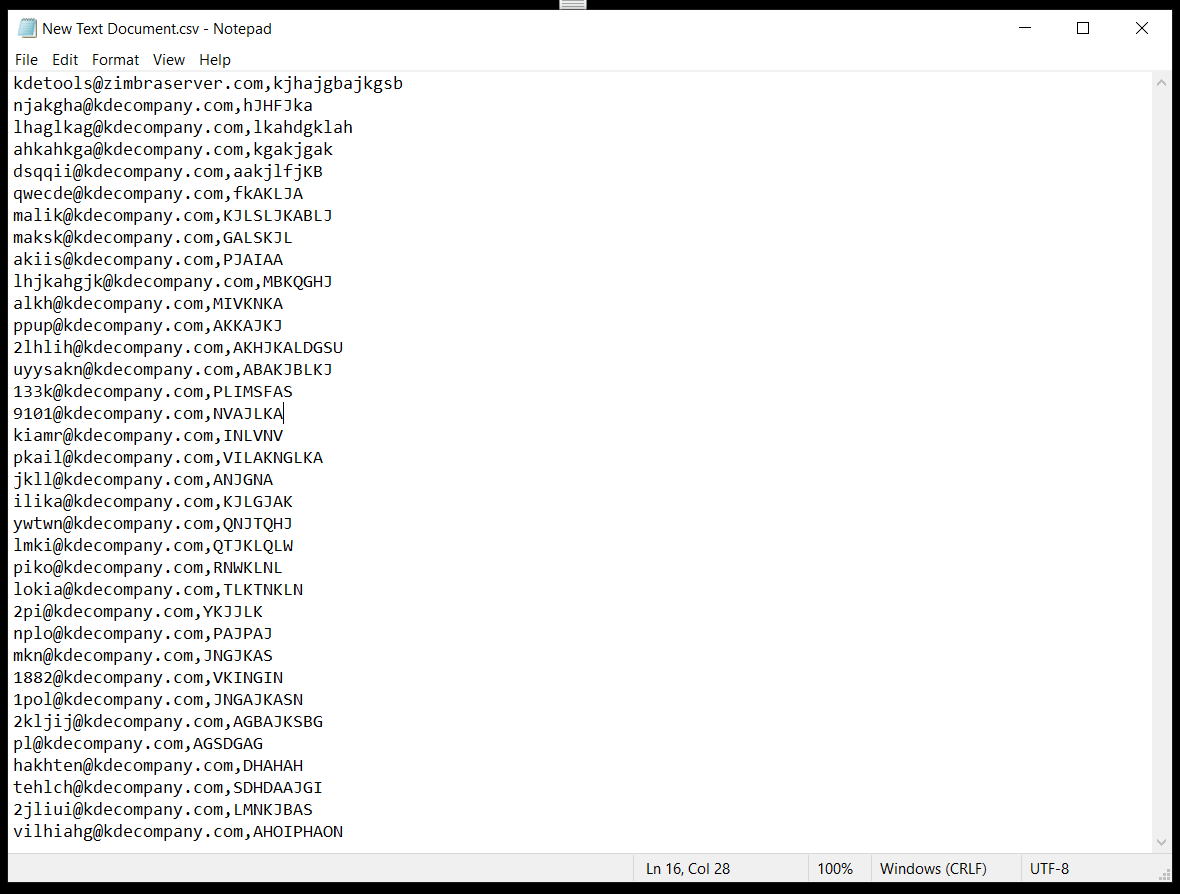
Steps 2:-Make a list of required email address and password with a comma in between.
For example the email address you wanted to add is abc@nacompany.com. Enter the email address "abc@kdecompany.com and password abcd987" "abc@kdecompany.com,abcd1234" with [NO Space Preceding or following comma] then press "ENTER" button for a new entry.
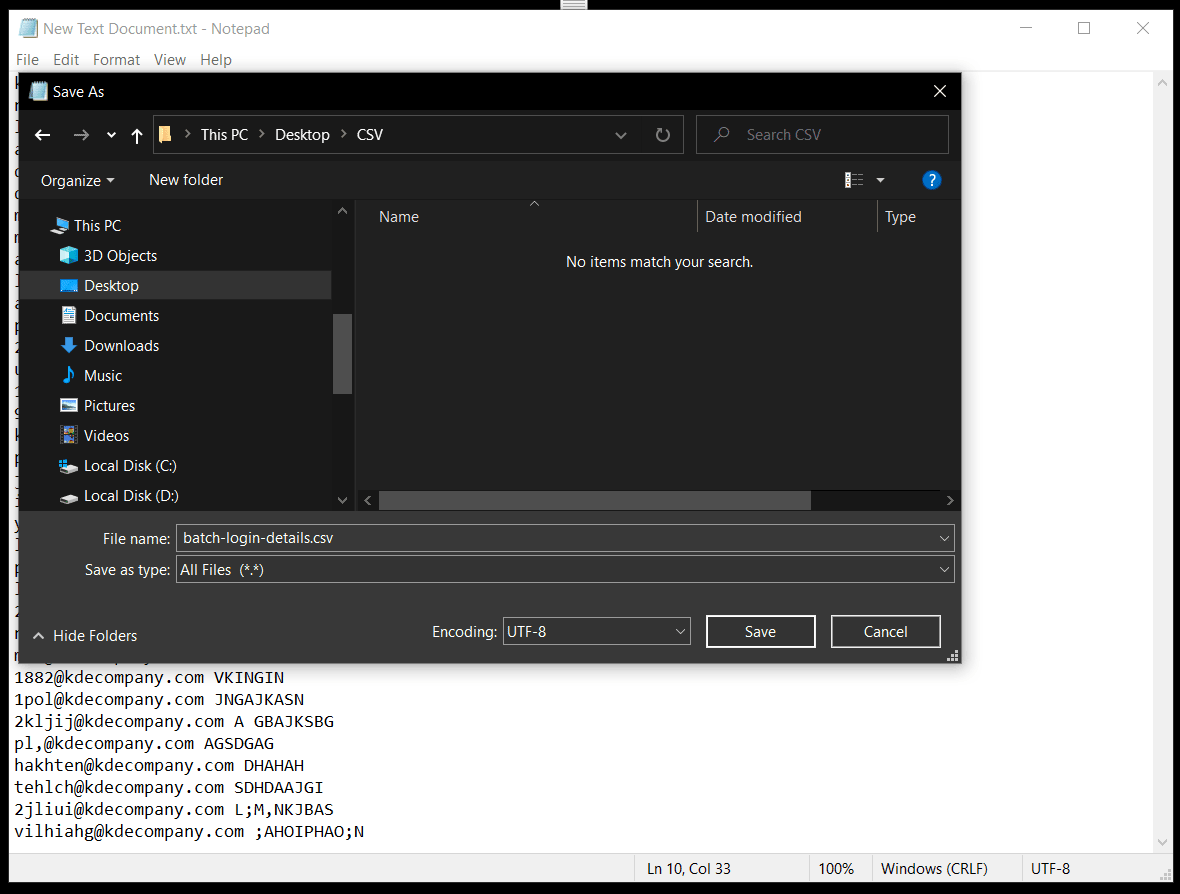
"Steps 3:- Save the file as CSV with the desired name. In the 'File name' box type your filename followed by .csv and keep the 'Save as type' Text Documents and click Save.
"Use "Add CSV" Option to Batch Export Mailboxes Accounts at Once using KDETools Zimbra Cloud Migration Tool
"Steps-4:- : Consider the scenario of batch converting user mailboxes from Gsuite. Open KDETools Zimbra Cloud Tool, then Select Source Email as Gsuite and Check 'Use Batch Mode' option.
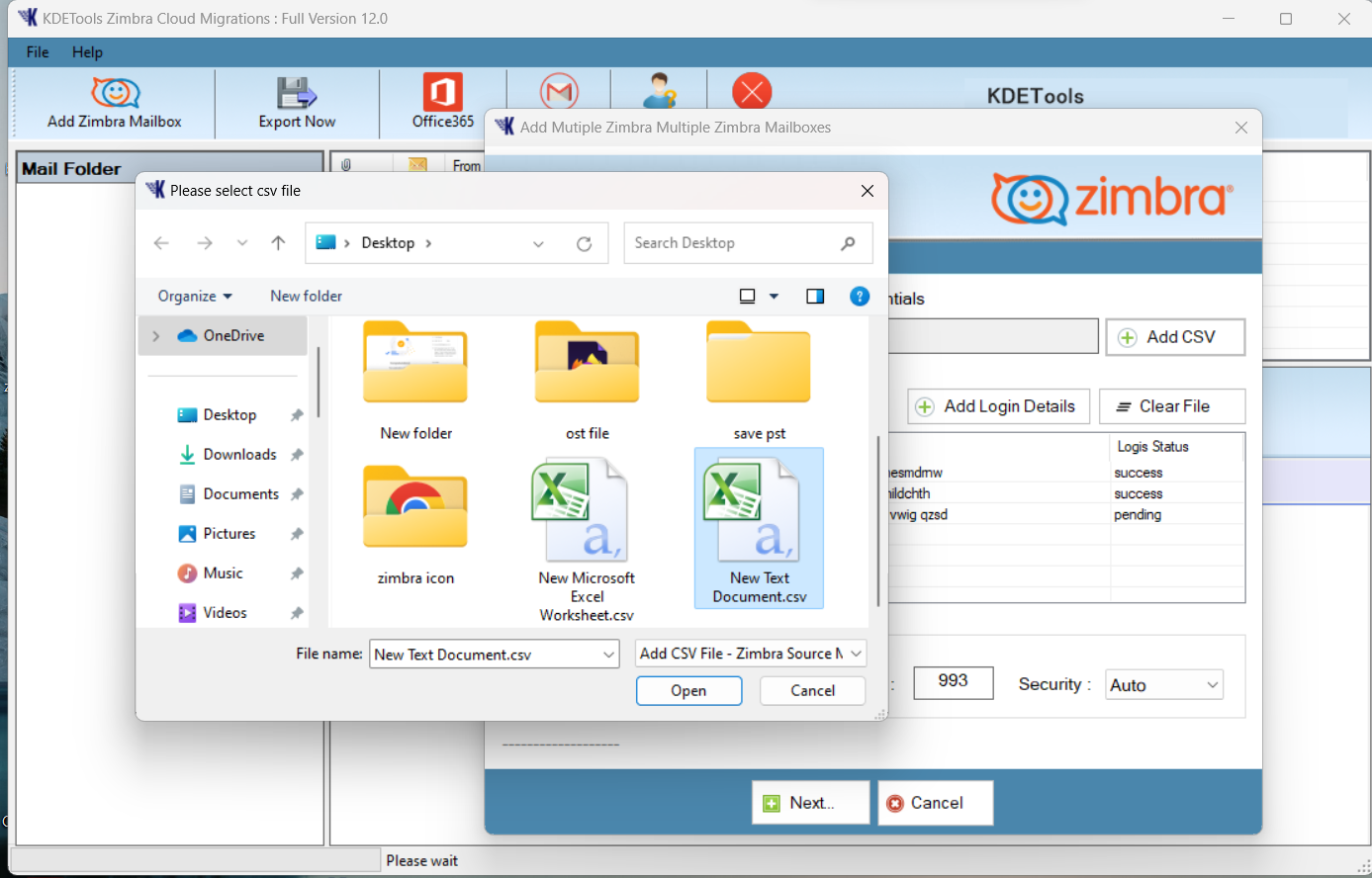
"Steps-5:- : Browse the created CSV file [multiple users] containing credentials.

Steps-6:- : Select desired email accounts to backup/migrate to destination file/email format.
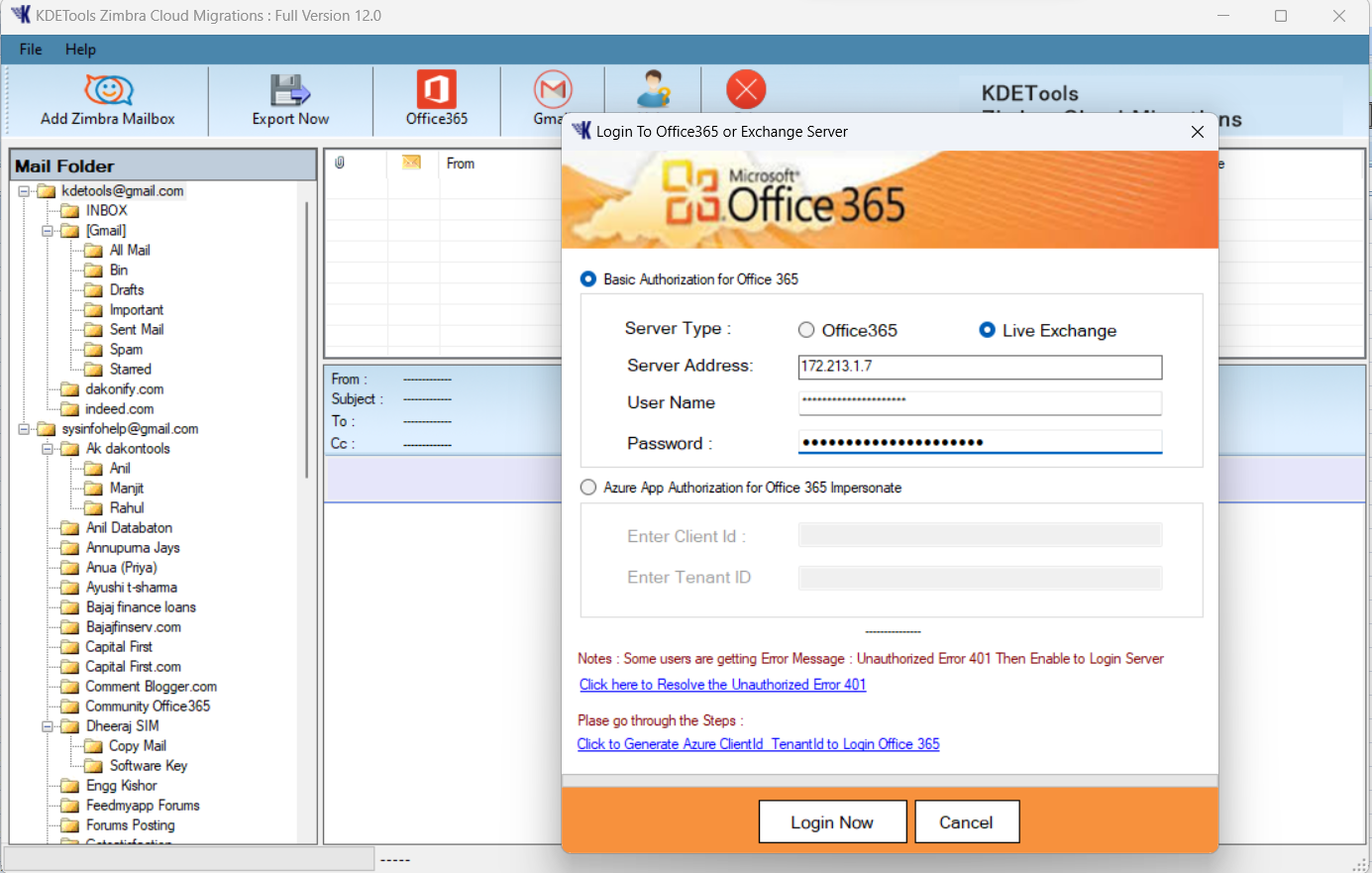
Steps-7:- : Click on Next > Select user account folders from the left panel and select desired saving option and click on Backup button.



D - 478, Sector - 7,
Dwarka, New Delhi - 75
India
Call Us
91-9555514144
You can also find us:



KDETools Software® is the Registered Trademark of KTools Software Pvt Ltd
© Copyright 2019 www.kdetools.com. All Trademarks Acknowledged.